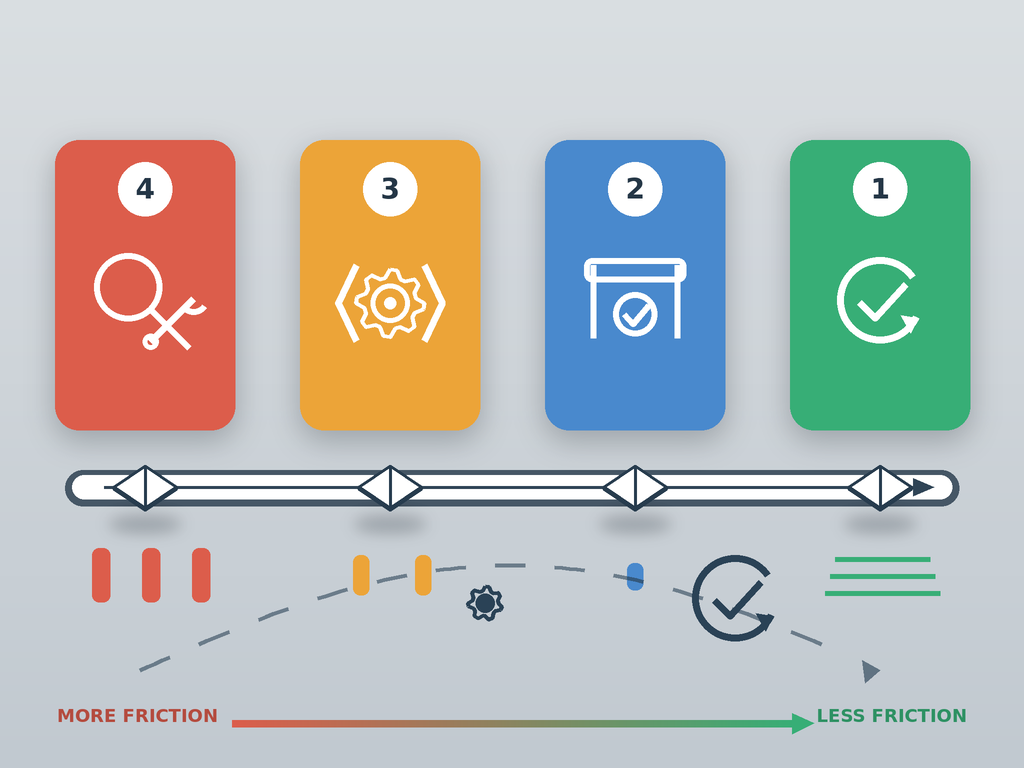
I have argued for some time that enterprise applications cannot all be treated the same. Some update cleanly through a vendor mechanism or app store. Others suit a silent command line, MSI, MSIX, PSADT, or repackaging.
The same principle should guide how much of each release path we automate.
Application teams are being asked to move more updates through the estate without adding equivalent manual effort. A useful starting point is to classify each update according to its deployment friction.
Application deployment friction is the amount of engineering, validation, and human intervention required to move an application release from its source to a verified production deployment.
Automatability is the proportion of that path that can run reliably without manual action.
Friction and criticality are separate
Business criticality influences how an update is governed. A technically simple update to a critical application may still require validation or formal approval from the application owner. A low-impact utility may have a difficult installer that requires substantial packaging work.
The friction level describes the current deployment path. Business criticality determines which additional controls the organization chooses to apply.
Recording these separately keeps the model focused on the technical and operational work required to deploy each release.
Level 1: Straight-through
A Level 1 update has a proven and repeatable path. The source is trusted, installation behavior is predictable, detection and rollback are understood, and testing has repeatedly produced successful results.
Intake, preparation, testing, publishing, and deployment can proceed automatically. Progressive rollout and endpoint telemetry provide further validation, with specialists becoming involved when the workflow detects an exception.
A Level 1 application might use a vendor update mechanism, an app store, MSI, MSIX, a command line, or a PSADT package. Any of these approaches can qualify once the organization has established a reliable end-to-end process.
Level 2: Supervised
A Level 2 update is largely automated and retains a defined human checkpoint.
An application owner may need to confirm a key business workflow. A release manager may approve promotion to the next deployment group. Deployment may also need to wait for an agreed maintenance window.
Automation can still handle source intake, package preparation, smoke testing, evidence capture, publishing, and the initial deployment. Human involvement remains focused on a specific decision.
Some applications may remain at Level 2 due to policy or business criticality, even when the underlying technical process has become highly reliable. They can still achieve a high degree of automatability.
Level 3: Engineered
A Level 3 update requires specialist packaging or testing work.
The application may have custom settings, unusual prerequisites, complex detection requirements, legacy dependencies, or an installer that changes between releases. A packager might need to adjust a PSADT script, update configuration files, modify transforms, manage dependencies, or expand the test process.
The surrounding stages can still operate automatically. Test machines can be provisioned, installation and removal checks can run, smoke tests can execute, evidence can be collected, and the completed package can move through publishing and staged deployment.
A partially automated Level 3 process can deliver substantial savings. Automating half of a repeated workflow saves meaningful time when the same work is performed across hundreds of applications and successive releases.
Specialist time can then remain focused on the parts that require experience and judgment.
Level 4: Investigative
A Level 4 update lacks an established deployment path.
This is common when an application first enters the estate, when documentation is poor, when a vendor changes its installer technology, or when previous releases have behaved unpredictably. It also includes loose-file deployments that are sometimes handed over by an in-house development team.
In that situation, the deployment team may receive a ZIP file, a folder structure, and a set of manual instructions. A specialist must determine where files belong, which processes or services must be stopped, what configuration must be preserved, how upgrades and rollbacks should work, and how successful deployment can be detected and tested.
Automation can support much of this investigation. Clean test machines can be provisioned, installation activity can be captured, before-and-after states can be compared, files can be copied, scripts can be executed, logs can be collected, and repeatable tests can be run.
The specialist can then turn what was learned into a reusable deployment method. This may include a PSADT script, configuration handling, prerequisite logic, detection rules, rollback steps, and automated tests.
Some unsupported or tightly coupled applications may remain at Level 4 until they are replaced. For many applications, Level 4 is the starting point for creating a dependable update process.
Automation still adds value at every level
Manual steps at Levels 3 and 4 do not remove the value of automating the rest of the workflow.
Source intake, test environment creation, repeatable installation checks, evidence capture, publishing, and deployment can all be automated around a specialist task or an approval. The resulting process may still require a person, but it requires less of that person’s time.
Those savings compound across an application estate. Removing even a modest amount of repetitive effort from every release can create considerable capacity over time.
The aim should be to identify which steps genuinely require human judgment and automate the repeatable work around them.
Specialist effort should reduce future friction
The first release often requires the most expertise. A packager can use that work to make future releases easier by converting manual knowledge into code and reusable assets.
Customizations can be scripted in PSADT. Detection and rollback logic can be documented and version-controlled. Dependencies can be handled consistently. Tests can be created to verify that the same behavior continues with each new version.
The next release can reuse those assets. The specialist may only need to update the source and version-specific details before running the established process again.
When the PSADT changes continue to apply and repeated releases pass the expected tests, an application can move quickly from Level 4 or Level 3 to Level 2. Further evidence may eventually support straight-through processing at Level 1.
Applications can also move back up the scale. A new installer, a failed test, a changed dependency, or a poor deployment result may justify more engineering or supervision for the next release.
The friction level therefore reflects the current update path. It should be reassessed as the application, packaging method, and available evidence change.
Measure how friction changes
Package completion is only one useful measure. Teams can also track manual effort per release, the percentage of workflow stages automated, first-pass testing success, recurring exceptions, time from source availability to verified deployment, and movement between friction levels.
These measures show where engineering work is making future releases easier and where the same manual effort continues to repeat.
A mature application estate will always contain updates at every level. Progress comes from automating repeatable stages wherever they occur and using each specialist engagement to reduce friction for the next release.
Through AddRemovePrograms.com, I plan to collect real-world examples and refine the definitions based on how applications behave in practice.